Showing posts with label machinima. Show all posts
Showing posts with label machinima. Show all posts
Monday, May 23, 2011
Virtual Art Presentation
Hope your summer is going well so far, despite the rain. And cold. It will be summer weather soon! Last weekend was the 7th Media in Transition conference at MIT, a biannual event that I look forward to every time. It's always interesting to see how people are defining and redefining the field of "media." The topic was "Unstable Platforms: The Promise and Peril of Transition," an intriguing concept to think about in all kinds of ways. My abstract grew into a huge paper (some links don't seem to work on every computer). I'll put the slides for the presentation I gave on virtual art in this post. And the part of the paper on virtual art is here.

Thursday, May 5, 2011
Tuesday, March 29, 2011
Cinematography and Machinima
We've spent some time thinking about game aesthetics and structure, and let's now turn to the moving image outside its interactive role, whether it be in cut scenes in a game, or a film/movie/animation. We'll use the example of machinima as one form of moving image creation and capture. After we get past the setup, many of the principles of cinematography and editing are the same as for any moving image, and you can follow or break the rules as you wish. Here are the notes for today's class, so you can concentrate on the ideas and the activities.
MISE-EN-SCENE: What's in the shot
Setting
Costume
Lighting
Figure Expression and Movement
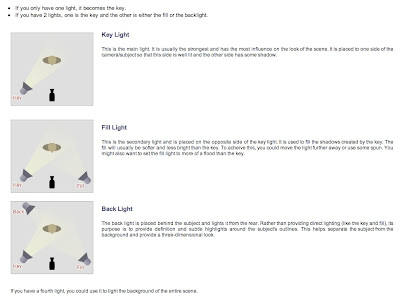
LIGHTING: 3 POINT LIGHTING: key, fill, back

MACHINIMA: Environment lighting, and also lighting kits, or lights you make

PHOTOGRAPHIC QUALITIES OF THE SHOT
Look of an image
balance of dark and light
depth of space in focus
relation of background and foreground
use of color, saturation, tone
focus
lenses to change depth in a shot (either fixed with a telephoto or fish eye, or rack or zoom shots)
FRAMING
Angle
Height of the camera
Canted angles
Following shot (moving camera):PANNING, TRACKING, TILTING, CRANING
Point of view shot
SCALE/PROXIMITY
ELS: landscape, crowd, building--establishing shot
LS: Standing human figure is height of screen (roughly)--character and surroundings
MLS: knees/mid-thigh up (shot Americain bc of its use in cowboy pictures)
MCU: chest up--get to see the face, gestures
CU: head
ECU: small object, part of the body

CAMERA MOVEMENT
crane
handheld, steadycam
pan
tilt
tracking shot
whip pan
For Machinima: Space Navigator 3-d mouse

What to do with those shots!
EDITING AND MONTAGE
Editing can be based on rhythm, time, space, tone, theme
"The Kuleshov Effect" With his experiment, Kuleshov learned 3 things:
1) a cut could serve a narrative function (eyeline match, flashback, what a character is thinking)
2) also it could generate an intellectual response—(metaphor, contrast, parallel)
3) emotional cut: rhythmic, tonal (increasingly dark or light0, form cut (match cut), directional cut
a single cut can function on all three levels: narrative, intellectual, emotional
Straight cut
Jump cut
Cross cut (or parallel cut)
Contrast cut
Form cut (match cut)
TRANSITIONS:
Fade-out
Fade-in
Dissolve
Synecdoche (part for a whole)
Form dissolve
Wipe
Iris
Wednesday, March 2, 2011
Building & Machinima Workshop
There is an essential skill that is key for both building and machinima--moving the "camera" in the virtual world. We'll experiment with that, and I'll also show you some tools people have made to help streamline camera positioning. Then you'll try out your cam skills as you create a virtual sculpture and then pop some scripts into it, because that is how the real magic happens. Then we'll break into teams and shoot a little footage.
First, as an example of engaging use of machinima and also an edifiying and entertaining tutorial on the camera:
First, as an example of engaging use of machinima and also an edifiying and entertaining tutorial on the camera:
Slurl to AngryBeth's machinima tv studio with camera switcher (25 L$). You'll need basic prim movement and cam skills to use this.
Building tools on the SL wiki
Script Me, please! 3greenseggs.com autoscript generator. But if you plan on doing any real building or using scripts, you are going to have to learn the basics of lsl, Linden Scripting Language, and how scripts work, so you can figure out what is going wrong when it does, or how to tweak a script you get from a generator, from the wiki, or another source. Simon Kline runs terrific classes in Second Life (see: Kline Labs), and there are other ways to learn as well.
Monday, February 14, 2011
Cultural Interfaces & Machinima

Today we'll connect the reading you've been doing in Manovich's book with the Unity 3D workshop we did last week and the machinima workshop we'll do this week. As we learn new software programs and become more aware of how cultural forms like games or movies are constructed, we learn new aspects of their interfaces, and I'll keep drawing your attention to that, asking you to reflect upon your experiences as both a maker and a player/spectator/reader of digital narrative. So we need to think a little about subjectivity, and how narrative, and particularly digital narrative can construct it.
Subscribe to:
Posts (Atom)